La Compagnie du Web
La Compagnie du Web

La Compagnie du Web

ExpertFranceFrom $1K
La Compagnie du Web
La Compagnie du WebPro Expert1mo

ONE QUESTION !

Hi everyone,

I've been using Framer for a while to build websites, and there's something that's been bothering me.

When I look at the live site, the <h1> tag seems to be duplicated several times because Framer includes separate versions for desktop, tablet, and mobile. I'm concerned this might send a negative signal to Google and hurt my SEO score.

How do you deal with this ?

- Do you remove the <h1> tags on the tablet and mobile versions and keep it only on desktop ?

- Do you have any other tips or workarounds ?

- Or is this actually not a big deal for SEO ?

Thanks in advance !

La Compagnie du Web
La Compagnie du WebPro Expert1mo

Just wrapped my first Framer template (WaterGuard) — built for water/environmental engineering firms, would love feedback

Hey everyone,

I just finished my first template for the Framer marketplace, called WaterGuard. It came out of a real client build for a water/wastewater engineering firm, so the structure is pretty opinionated rather than generic.

Some things I focused on:

Every page runs the same conversion path: full-bleed hero → proof through animated metrics → step-by-step service breakdown → direct route to contact

14 pages total, including six full service page layouts and a CMS blog

Colors and text styles as reusable tokens, so the whole site restyles from one place

Motion is baked into the layout rather than bolted on — character-by-character hero reveals, scroll-triggered counters, staggered cards, parallax imagery

Three hand-tuned breakpoints, with grids and type scales adjusted per breakpoint

It's written for the water sector specifically, but the bones should suit any technical services business — engineering, inspection, industrial maintenance, environmental compliance, that kind of thing.

Would genuinely love feedback, especially from anyone who's built service-based templates before — curious what you'd change or what's missing.

https://shorturl.at/ywnGr

La Compagnie du Web
La Compagnie du WebPro Expert2mo

I thought I'd optimized every image on my Framer sites. Then I found the ones hiding in my CMS.

Hey everyone,

I've been building Framer sites for a couple years now, and before every launch I'd do the same ritual: go page by page, check file sizes, compress the heavy stuff, convert to WebP, add alt text. Tedious but manageable.

Then on one project I noticed a background image inside a component instance I'd never actually clicked into, still a fat 2MB PNG, completely untouched. And a bunch of CMS collection items with images that don't even show up when you're just scanning pages visually. I'd been doing this "thorough" audit for two years and still missing a chunk of every project. 😅

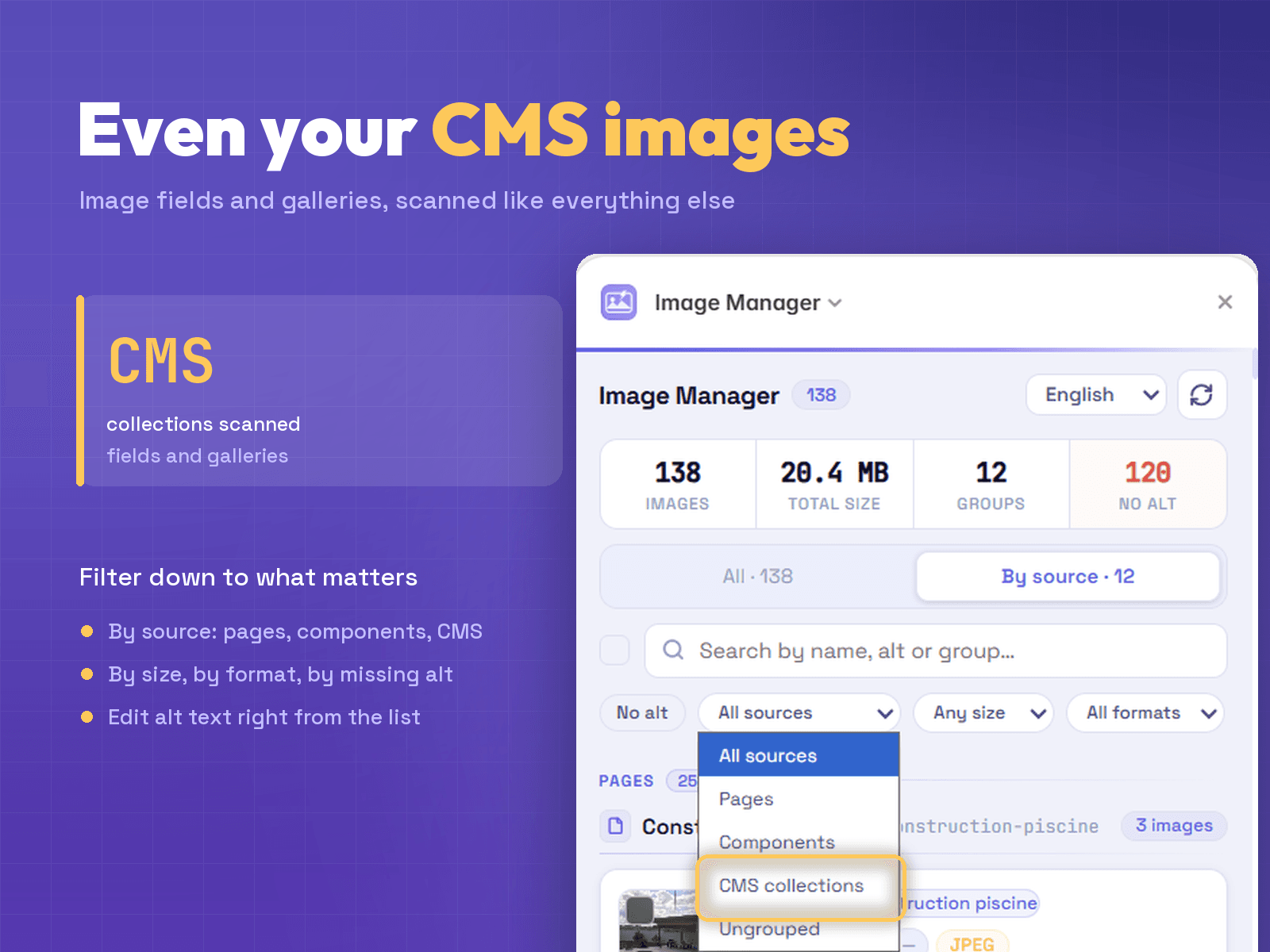
So I built a plugin to actually cover everything: pages, components, CMS collections, all of it, in one panel. Cleaned it up, used it on client work for a while, put it on the Marketplace as Image Manager.

What it does now:

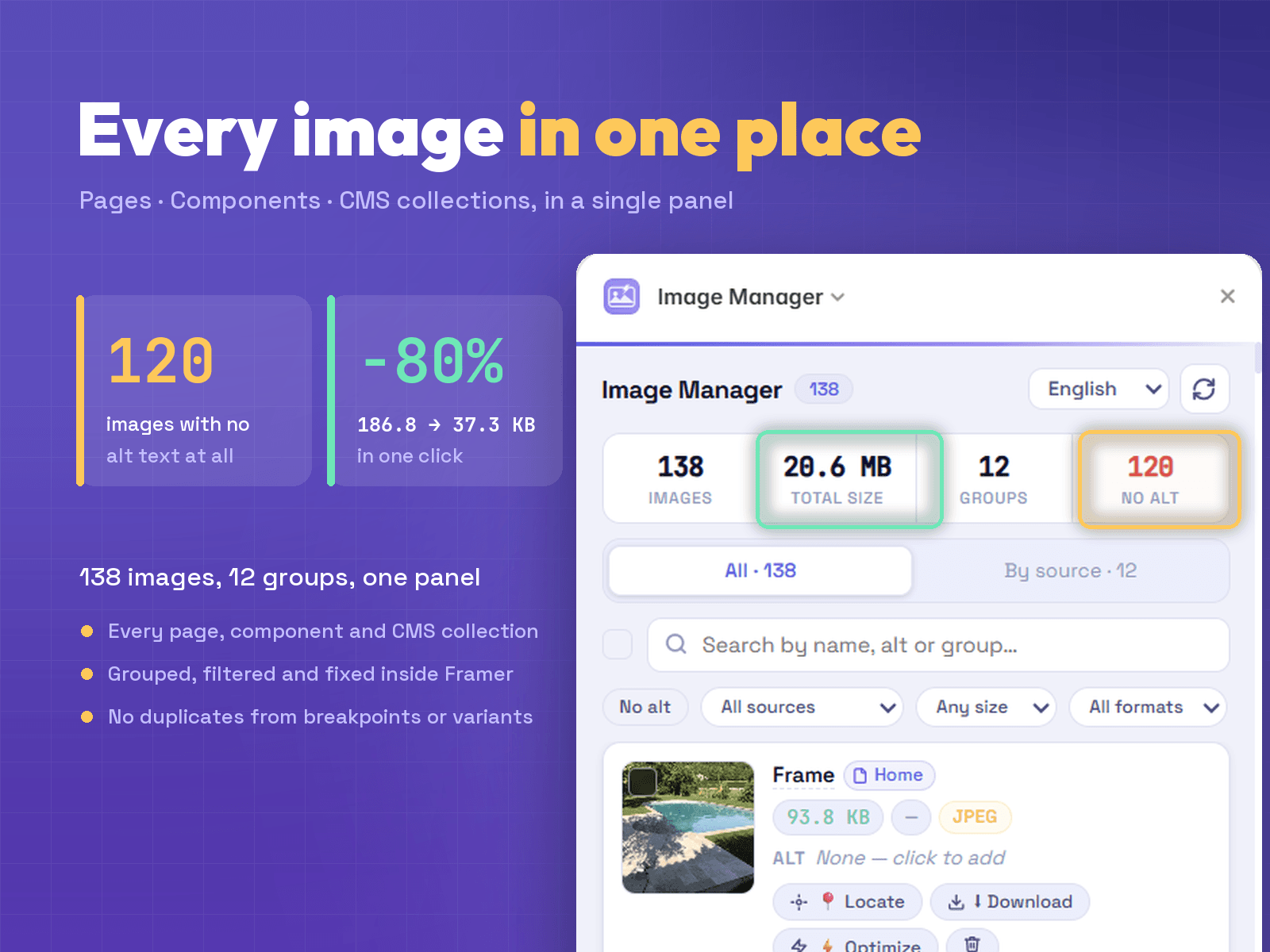
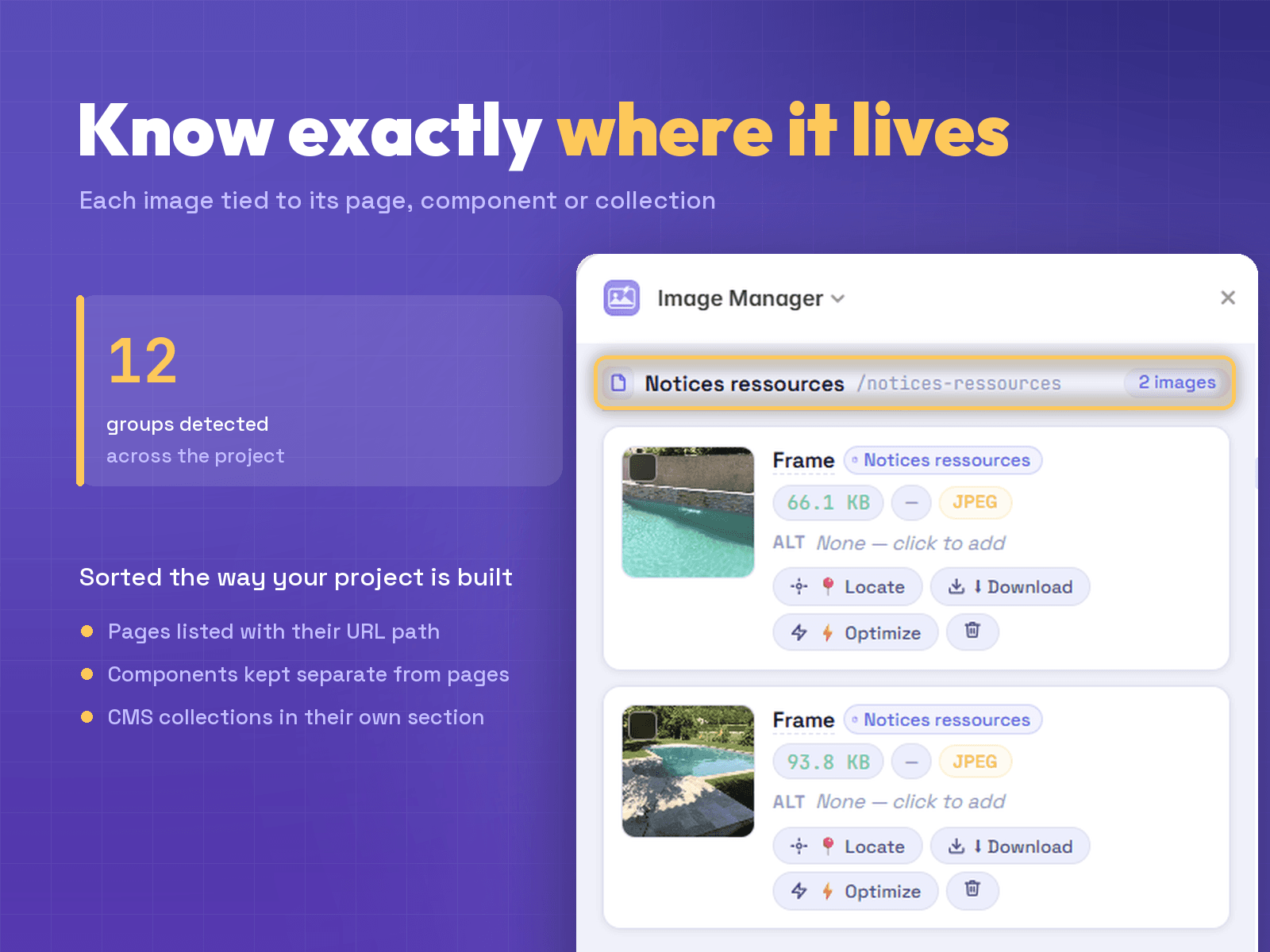
🔍 Scans your whole project - pages, components, and CMS collections (image fields + galleries), not just what's visible on canvas

🗂 Groups everything by where it actually lives, so you're not hunting through pages

🚫 One entry per image, no duplicates from desktop/tablet/mobile breakpoints or component variants

⚠ Flags issues at a glance - oversized files, missing alt text

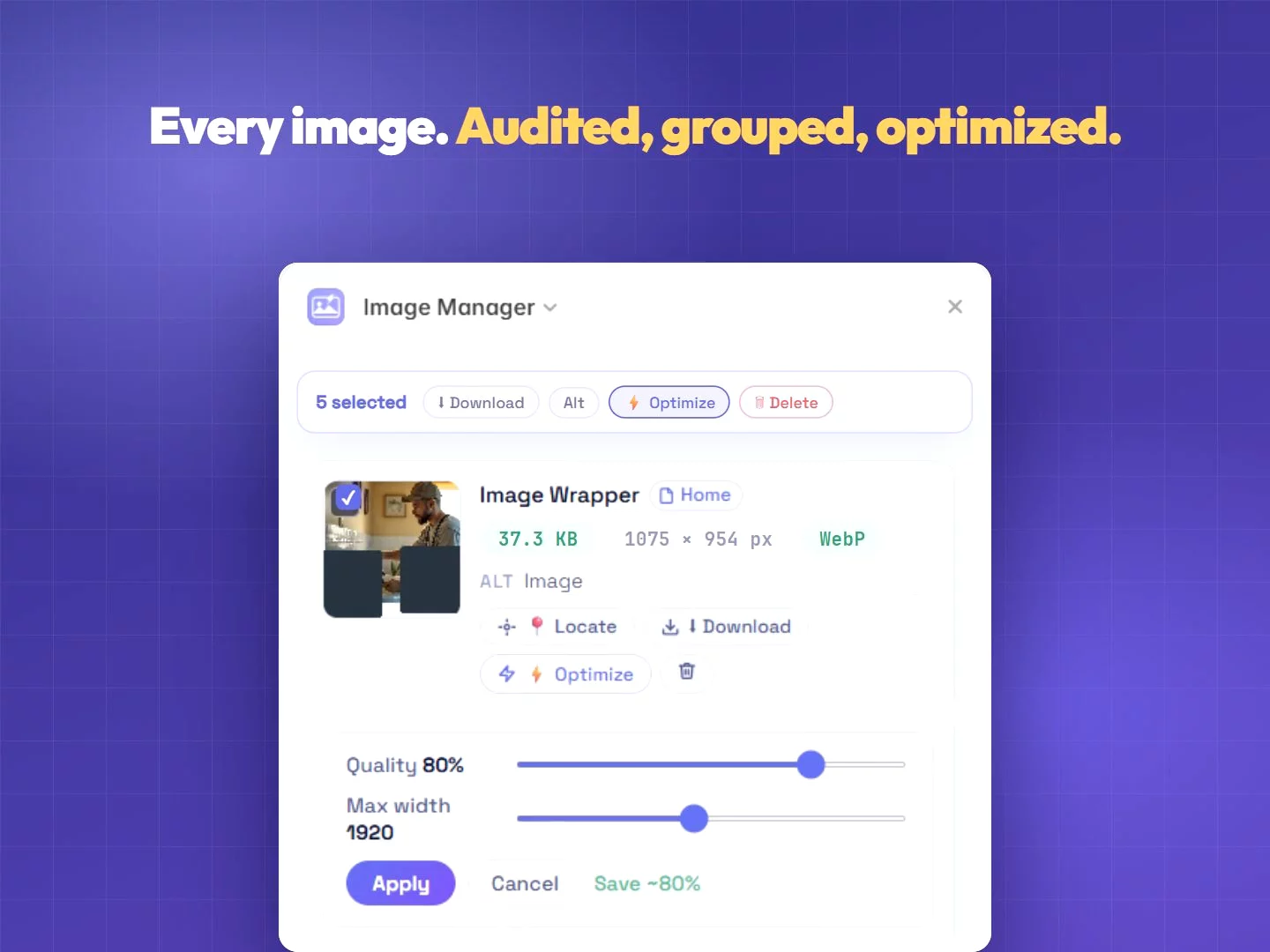
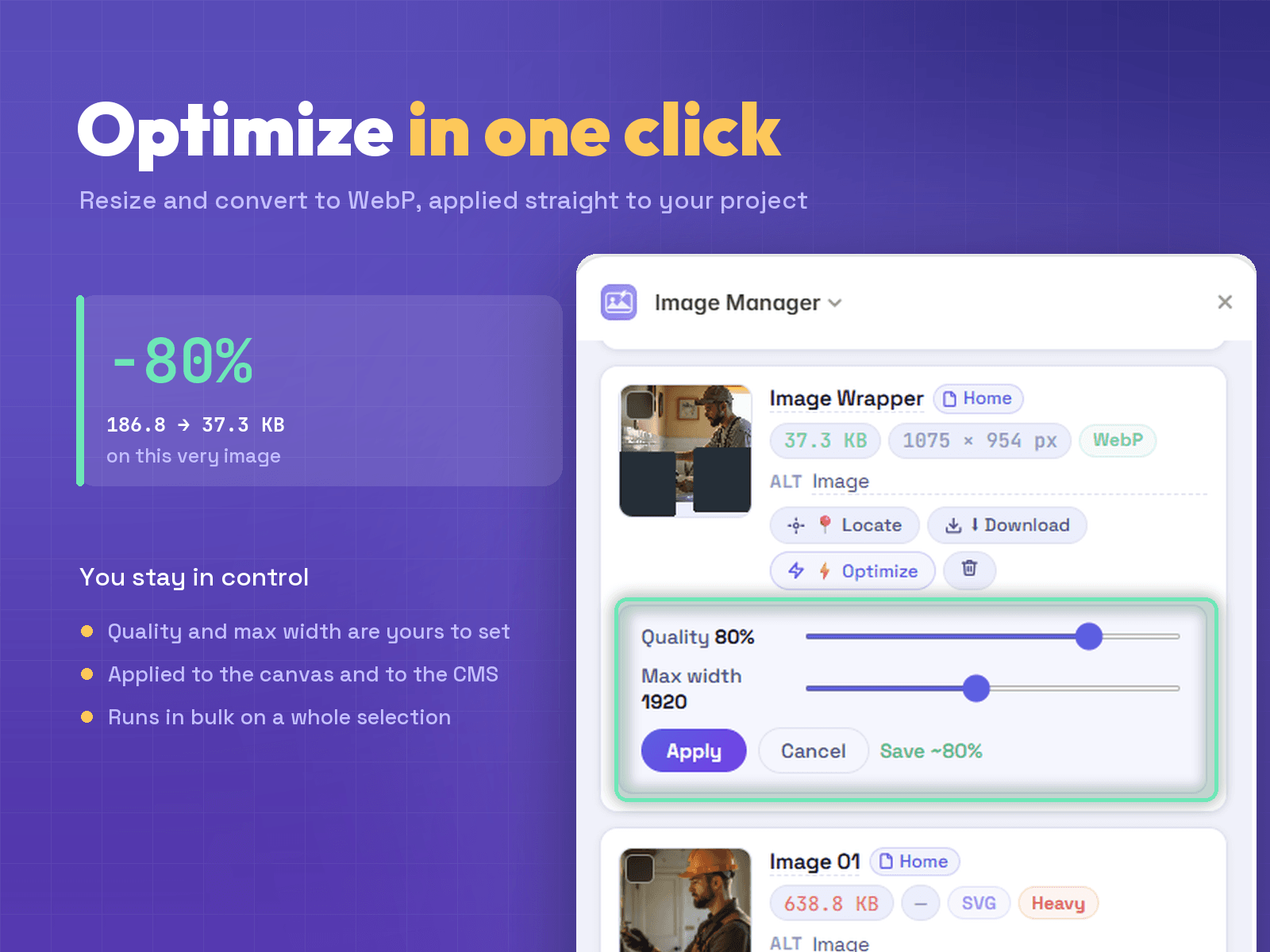
⚡ One-click optimize: resize + convert to WebP, applied straight to your project

✅ Bulk actions for fixing a whole batch at once instead of one by one

✏ Inline alt text editing for SEO and accessibility

Genuinely curious how the rest of you handle this: by hand, external tools like Squoosh/TinyPNG, or just letting it slide? And if there's something that would actually save you time here, I'm taking notes. 📝

Full disclosure, it's my own plugin, here if you want a look (€7, lifetime): [Link]

Happy to answer anything 👋

La Compagnie du Web
La Compagnie du WebPro Expert2mo

I thought I'd optimized every image on my Framer sites. Then I found the ones hiding in my CMS.

Hey everyone,

I've been building Framer sites for a couple years now, and before every launch I'd do the same ritual: go page by page, check file sizes, compress the heavy stuff, convert to WebP, add alt text. Tedious but manageable.

Then on one project I noticed a background image inside a component instance I'd never actually clicked into, still a fat 2MB PNG, completely untouched. And a bunch of CMS collection items with images that don't even show up when you're just scanning pages visually. I'd been doing this "thorough" audit for two years and still missing a chunk of every project. 😅

So I built a plugin to actually cover everything: pages, components, CMS collections, all of it, in one panel. Cleaned it up, used it on client work for a while, put it on the Marketplace as Image Manager.

What it does now:

🔍 Scans your whole project - pages, components, and CMS collections (image fields + galleries), not just what's visible on canvas

🗂 Groups everything by where it actually lives, so you're not hunting through pages

🚫 One entry per image, no duplicates from desktop/tablet/mobile breakpoints or component variants

⚠ Flags issues at a glance - oversized files, missing alt text

⚡ One-click optimize: resize + convert to WebP, applied straight to your project

✅ Bulk actions for fixing a whole batch at once instead of one by one

✏ Inline alt text editing for SEO and accessibility

Genuinely curious how the rest of you handle this: by hand, external tools like Squoosh/TinyPNG, or just letting it slide? And if there's something that would actually save you time here, I'm taking notes. 📝

Full disclosure, it's my own plugin, here if you want a look (€7, lifetime): [Link]

Happy to answer anything 👋

Reposted by La Compagnie du Web
La Compagnie du Web
La Compagnie du WebPro Expert2mo

🚀 2 years of manually compressing images in Framer. I finally built a plugin to do it for me.

Hey everyone,

I've been building Framer sites for about two years, and the same boring task slowed me down on basically every project: image optimization.

Right before launch I'd go through the whole site checking file sizes, compressing the heavy ones, converting to WebP, and adding alt text for SEO and accessibility. Nothing hard, just tedious, and way too easy to miss an image or two.

So a few months ago I built a little tool for myself to handle it without leaving Framer. I used it on a bunch of client projects, cleaned it up, and ended up putting it on the Marketplace as Image Manager.

What it does:

Scans every background image across all your pages in a single panel

Flags issues at a glance - oversized files, missing alt text, PNGs that should be WebP

Compresses + converts to WebP in one click, applied right on the canvas

Bulk actions - fix dozens of images at once instead of one by one

Inline alt text editing to clean up SEO and accessibility

It started as a personal productivity thing, but heavy images wreck your Core Web Vitals and missing alt text quietly hurts your SEO, so I figured other Framer folks were hitting the same wall.

Genuinely curious how you all handle this today: by hand, with external tools like Squoosh / TinyPNG, or honestly just skipping it? And if there's a feature that would actually save you time, I'm taking notes.

Full disclosure, it's my own plugin - here if you want a look ($5, lifetime): Link

Happy to answer anything 👋

La Compagnie du Web
La Compagnie du WebPro Expert2mo

🚀 2 years of manually compressing images in Framer. I finally built a plugin to do it for me.

Hey everyone,

I've been building Framer sites for about two years, and the same boring task slowed me down on basically every project: image optimization.

Right before launch I'd go through the whole site checking file sizes, compressing the heavy ones, converting to WebP, and adding alt text for SEO and accessibility. Nothing hard, just tedious, and way too easy to miss an image or two.

So a few months ago I built a little tool for myself to handle it without leaving Framer. I used it on a bunch of client projects, cleaned it up, and ended up putting it on the Marketplace as Image Manager.

What it does:

Scans every background image across all your pages in a single panel

Flags issues at a glance - oversized files, missing alt text, PNGs that should be WebP

Compresses + converts to WebP in one click, applied right on the canvas

Bulk actions - fix dozens of images at once instead of one by one

Inline alt text editing to clean up SEO and accessibility

It started as a personal productivity thing, but heavy images wreck your Core Web Vitals and missing alt text quietly hurts your SEO, so I figured other Framer folks were hitting the same wall.

Genuinely curious how you all handle this today: by hand, with external tools like Squoosh / TinyPNG, or honestly just skipping it? And if there's a feature that would actually save you time, I'm taking notes.

Full disclosure, it's my own plugin - here if you want a look ($5, lifetime): Link

Happy to answer anything 👋

La Compagnie du Web
La Compagnie du WebPro Expertin Marketplace·4mo

🚀 2 years of manually compressing images in Framer. I finally built a plugin to do it for me.

Hey everyone,

I've been building Framer sites for about two years, and the same boring task slowed me down on basically every project: image optimization.

Right before launch I'd go through the whole site checking file sizes, compressing the heavy ones, converting to WebP, and adding alt text for SEO and accessibility. Nothing hard, just tedious, and way too easy to miss an image or two.

So a few months ago I built a little tool for myself to handle it without leaving Framer. I used it on a bunch of client projects, cleaned it up, and ended up putting it on the Marketplace as Image Manager.

What it does:

Scans every background image across all your pages in a single panel

Flags issues at a glance - oversized files, missing alt text, PNGs that should be WebP

Compresses + converts to WebP in one click, applied right on the canvas

Bulk actions - fix dozens of images at once instead of one by one

Inline alt text editing to clean up SEO and accessibility

It started as a personal productivity thing, but heavy images wreck your Core Web Vitals and missing alt text quietly hurts your SEO, so I figured other Framer folks were hitting the same wall.

Genuinely curious how you all handle this today: by hand, with external tools like Squoosh / TinyPNG, or honestly just skipping it? And if there's a feature that would actually save you time, I'm taking notes.

Full disclosure, it's my own plugin - here if you want a look ($5, lifetime): Link

Happy to answer anything 👋