About Project Scroll
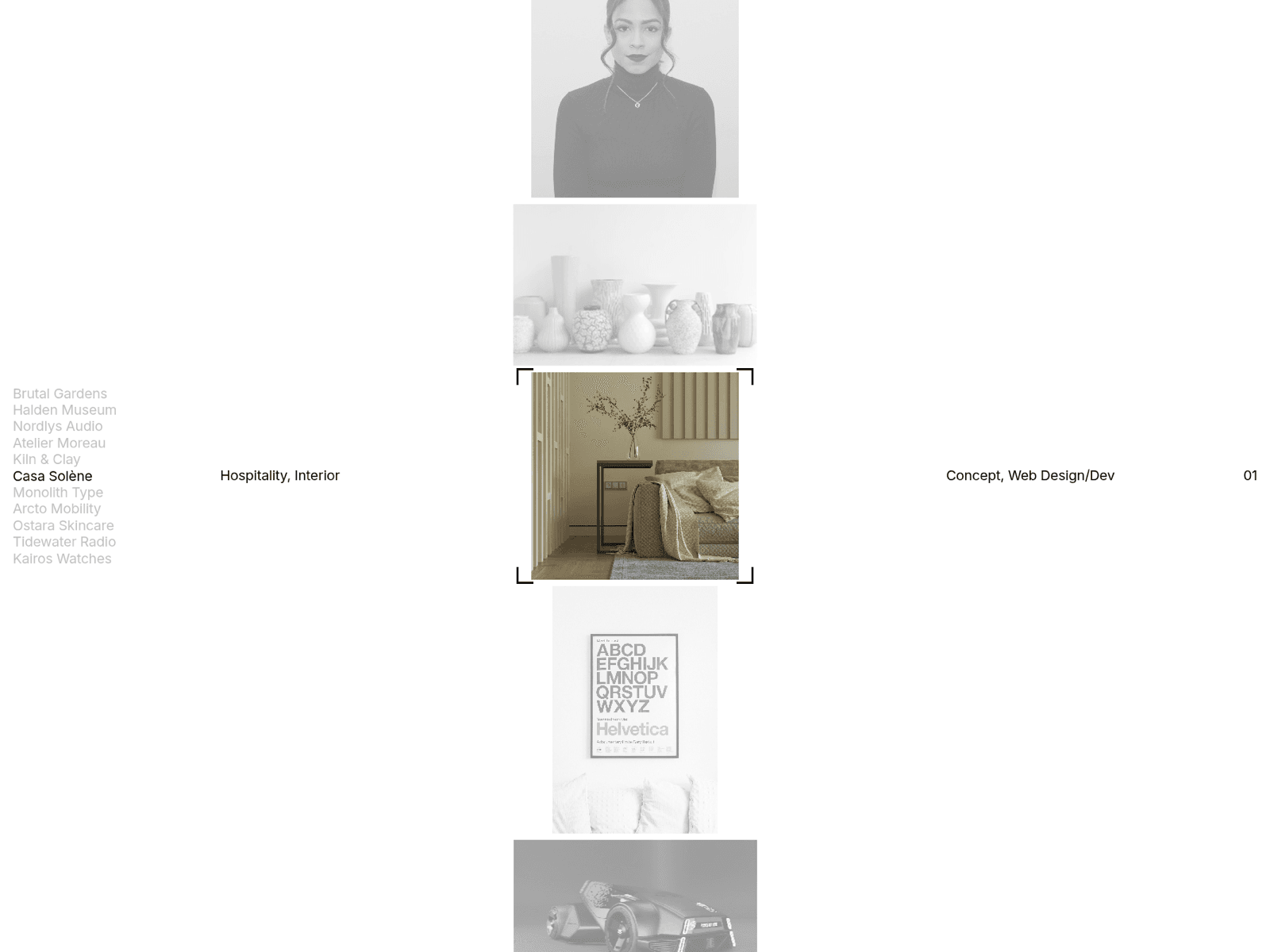
Project Scroll turns a list of projects into a full-screen index. The images sit in one endless column. Scroll, drag or use the arrow keys, and the nearest project snaps to the centre of the screen.
The centred project shows in full colour while the others fade to grayscale. Its name is highlighted in a list that rotates with the scroll, and its category, services and number appear on the centre line. Corner marks frame the centred image and resize to fit each project.
What you can change
Projects: title, category, services, image, image ratio, size and link
Layout: image width, gap, corner radius and padding
Marker: corners, brackets or none, with colour, size, weight and inset
Style: font, text colour, background, grayscale and dimming
Behaviour: scroll capture, speed and smoothness
How it behaves
Loops forever in both directions
Click a name or an image to bring that project to the centre
Click the centred image to open its link
Adapts to desktop, tablet and phone widths on its own
Respects the reduced motion setting
How to use it
Place the component in a section that fills the screen (width 100%, height 100vh). Add your projects in the Projects control. If the page continues below the section, turn off Capture Scroll so visitors can keep scrolling the page.
Support and refunds
The component is free, so there is nothing to refund. Questions and bug reports: hello@framer-expert.com.